
1. Decide which part of the workbook earns a rewrite
Ask a workbook owner to show you the last report they sent. Where did the numbers come from? Who used the report, and what did they do because of it? One lab might want to stop pasting measurements into a monthly summary. Another might need to know which of three emailed copies contains the decision a reviewer approved. A script could solve the first problem while leaving the second untouched.
Write a sentence the owner can check: “Given an inspection export, produce the list of shipments that require review, and let the supervisor retrieve the decision used on a particular date.” Then draw the boundary. The instrument still produces the export; purchasing still records what happened to a shipment. The replacement owns the calculation and its review record. That sentence gives you a way to refuse expensive features and recognize a missing one.
There are good reasons to keep Excel. A scientist exploring a changing method needs to see intermediate values and try alternatives. If one team controls the template and the expensive mistake is choosing the wrong revision, fix distribution first. A rewrite earns its cost when repeated manual work, conflicting edits, or missing history interferes with a decision people actually make.
2. Find the rules the cells do not show you
Work on a copy. Save the workbook version, its source files, and a report the owner considers correct. Watch someone process both an ordinary file and an awkward one. Ask what they refresh, which warnings they investigate, and when they paste a value over a formula. A yellow cell may mean “awaiting supervisor review” to everyone on the shift. Its color will tell a programmer nothing about who can clear it.
Trace one reported field backward. Record its units, lookup table and effective date, linked files, named ranges, macros or add-ins, and any filters that exclude rows. Microsoft’s Spreadsheet Inquire can inventory hidden sheets, links and data connections on supported enterprise editions of Excel for Windows. Where it is unavailable, inspect those items in Excel with the owner. Neither exercise replaces observing what the person does.
For a Solver workbook, also capture what the analyst asked it to optimize: the objective cell, adjustable cells, constraints, starting values and selected method. A list of cell formulas omits that setup. If the analyst discards fits when the optimizer stops early, a replacement that silently reports its last estimate has changed the procedure.
A saved value is weak evidence by itself. Excel files can contain a formula and the value saved when it last calculated. A reader can extract that value without running the formula. Capture the calculation settings, refresh the intended inputs in the original environment, recalculate, and retain both the inputs and the resulting report. Record whether “precision as displayed” was already enabled; turning it on as an experiment can permanently change stored numbers.
3. Choose the technology by who runs it and who owns it
Start with how the answer reaches its user. If an analyst drops one export into a folder and needs a report back, a versioned R or Python program can read the file, check it, and write the result. Give it an explicit input format and make failure visible. Favor the language your team can maintain: an existing R analysis and an R reviewer are good reasons to use R; an established Python instrument interface and Python support team favor Python.
If several people need to explore results in a browser, an R calculation behind Shiny can preserve the analysts’ familiar statistical code. Posit documents both hosted and self-managed deployment. If the company already runs Power Apps, a low-code form may suit straightforward entry and review. Test it against realistic data: Microsoft documents that a query the service cannot delegate processes only a local subset, 500 records by default. A search that succeeds in a ten-row demo can miss the shipment you need.
When operators enter data, supervisors approve it later, and another system consumes the decision, budget for identity, durable records, and integration. Check your existing laboratory information management system (LIMS) first: can its supported configuration meet the requirement, and can you retrieve the history afterward? If so, extending it may cost less to support than a second application. Compare each credible option on the cost of the next method change, a support call, and retrieving an old report, as well as the initial build.
4. Set the acceptance criteria before translating formulas
Choose representative original files: an ordinary period, one with a known exception, and one at a decision boundary. Keep identifiers and units with the values. Write an expectation for each important output. Identifiers may need to match character for character, including leading zeros. A continuous estimate might allow a justified numerical difference. A review flag has to agree exactly unless the owner has approved a change to its meaning.
Write down the order of operations. Does the workbook convert units before comparing a limit? Is rounding only for the report, or does the disposition use the rounded value? What should happen when a denominator is zero or a required field is empty? Compare intermediate values at those points. A final total can agree while two rows have traded identifiers; that error matters the moment one of those rows is sent for review.
Treat differences as questions about the intended procedure. An undocumented formula may be right; a signed report may also contain a known mistake. Use a hand calculation, an independent reference, or the governing method to resolve the disagreement. Record the example, the owner’s decision, and which reports are affected. An intentional correction deserves its own change record. It should never disappear into a wider numerical tolerance.
5. Try the migration: one shipment changes disposition
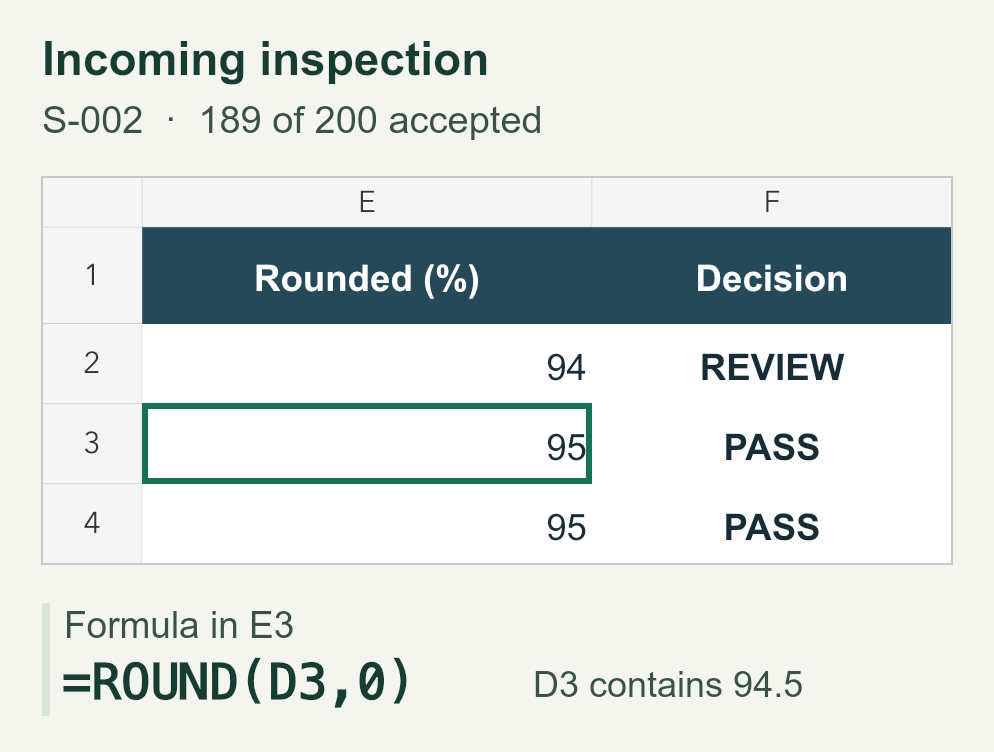
In this illustrative incoming-inspection workbook, each shipment has 200 inspected units. The rule is to round the accepted percentage to a whole number, then pass the shipment if that number is at least 95. This is an invented policy for comparing implementations, not a recommended inspection limit. The order matters: comparing an unrounded result with 95 would be a different policy.
For shipment S-002, 189 × 100 ÷ 200 is exactly 94.5. Excel’s worksheet ROUND gives 95. Python’s built-in round gives 94 because an exact tie goes to the nearest even integer. Both programs saw the same input and calculated the same percentage. The disagreement enters at rounding and changes the decision from PASS to REVIEW. The other two shipments agree, which is why testing only one routine file could miss it.
Download the workbook and the Python comparison below. Recalculate the “Incoming inspection” sheet, then save that sheet as a UTF-8, comma-delimited CSV named excel-migration-rounding.csv. Run the command below from the folder containing the CSV and the script. The script compares the workbook results with ordinary Python rounding and with an explicit decimal half-up rule. We recalculated the workbook in LibreOffice Calc and compared its CSV export: the half-up calculation matched all three results. No Python packages are required.
Ask the owner which rule belongs in production. If the approved procedure uses the rounded percentage, retain the half-up rule and keep S-002 as a regression case. If it requires at least 95 percent of units to be accepted before rounding, 189 of 200 must go to review. That finding calls for an approved correction and a look at affected records, even if two implementations can be made to agree.
| Shipment | Accepted of 200 | Exact % | Workbook | Python round |
|---|---|---|---|---|
| S-001 | 188 | 94 | 94 · REVIEW | 94 · REVIEW |
| S-002 | 189 | 94.5 | 95 · PASS | 94 · REVIEW |
| S-003 | 190 | 95 | 95 · PASS | 95 · PASS |
python3 compare-rounding.py excel-migration-rounding.csv6. Choose where the program runs and where the record lives
For a batch program, decide who starts it, under which account, and where it may read and write. A scheduled job must still work when the original analyst is on leave. Record the runtime version. For R, renv can snapshot the package library and restore it from a lockfile; for Python, pip documents pinning direct and indirect dependencies. Have a second person recreate the environment and run a known input. That check can uncover a missing driver or system library that a package list alone would miss. For a disconnected instrument workstation, test installation there and decide how approved updates and results move across the network boundary.
A browser app removes the installation from the analyst’s desk, but somebody still owns the service. Agree with IT on access, hosting location and support before uploading real files. Separate temporary work from retained results. Streamlit ties session state to a browser connection; reloading the tab resets that state. Google Cloud Run’s default writable filesystem disappears when its instance stops. A record somebody must reopen next month needs storage that survives both.
Try interrupting a save at the worst moment. If a supervisor approves a revision, the approval and the revision it names must stay together. A database transaction can commit both changes as a unit or neither; PostgreSQL documents this all-or-nothing behavior. Then test a second submission of the same file. Decide whether to return the existing result or create a deliberate new revision. Two apparent approvals for one upload are a poor surprise at handover.
7. Validate what people will rely on
Give an analyst and a reviewer a representative file in the environment they will use. Have the analyst import it, correct a rejected row, and submit it. Have the reviewer find the source, interpret the result, and retrieve the approved record after signing out and back in. Retain the input, expected decision, software and method versions, actual result, and disposition of any discrepancy. Choose additional tests according to what a failure could change. A broken chart legend and a missing review flag merit different attention.
In a regulated setting, involve the quality owner while defining intended use. For U.S. drug manufacturing under 21 CFR 211.68(b), controls include authorized changes and accuracy checks on computer inputs and outputs; the degree and frequency of verification depend on system complexity and reliability. FDA’s Part 11 scope guidance asks which records are required under the applicable underlying rules and how electronic records are used. Those are decisions about the actual workflow. Choosing a programming language or a cloud service does not settle them.
Agree on the evidence needed to authorize use. For a reporting script, a source file, a checked report and a witnessed run may address the main risk. If records must be approved, corrected and retained, also demonstrate that an unauthorized user cannot approve, that a correction preserves the earlier record, and that an authorized person can retrieve both. Supplier test results can support the assessment; the lab still evaluates and validates its configured workflow for its intended use.
8. Switch over with a recovery plan and a named owner
Run the old and new paths on the same incoming work for a period chosen to cover meaningful variation. A month of routine results tells you little about a quarterly exception. Agree in advance who investigates differences, which system is authoritative during the comparison, and what prevents cutover. Before switching, restore a backup somewhere separate and have a reviewer retrieve a known report. Seeing a successful backup job does not answer that question.
Choose a cutover date and say where new work starts from that point. Archive the approved workbook, its dependencies and a readable record of earlier results. If the service fails on day two, who pauses submissions, where can staff see the last accepted result, and how will they reconcile work entered during recovery? Rolling back the application does not undo the decisions already recorded under the new version.
A useful first project is one workbook, one responsible owner, and one output worth defending. Bring a redacted export, the corresponding approved report, and a case where someone had to intervene. With those three items, a team can estimate the calculation, the work around it, and the cost of keeping it reliable after the person who wrote it moves on.
Limits of a workbook comparison
Agreement with the old file answers one question: did these inputs produce the expected outputs? It cannot show that a method remains scientifically appropriate, that a new instrument exports the same units, or that an operator can recover from a failed import. When the method itself changes, identify the new question and the evidence it needs. Keep that work separate from demonstrating a faithful migration.
Frequently asked questions
Do we have to migrate old workbooks into the new database?
Only if the intended use or retention obligations call for it. If users only need to retrieve historical reports, a tested, readable archive may serve them better. If they need to amend an old result, carry over its identity and history and test that amendment end to end.
What belongs in the first migration estimate?
Ask for separate estimates for discovering rules, implementing the calculation, connecting systems, verifying outputs, and operating the release. List the assumptions behind each. Missing source data, an unsupported add-in, or an undecided approval rule can matter more than the number of worksheets.
Primary references
- Analyze a workbook with Spreadsheet InquireMicrosoft
- Define and solve a problem by using SolverMicrosoft
- Working with formulas in SpreadsheetMLMicrosoft
- Change formula recalculation, iteration, or precision in ExcelMicrosoft
- Deploying Shiny apps to the webPosit
- Power Apps query delegation and its limitsMicrosoft
- How Excel rounds a numberMicrosoft
- Built-in functions: roundPython Software Foundation
- Decimal arithmetic and rounding modesPython Software Foundation
- Reproduce an R package library with renvPosit
- Repeatable installs with pipPython Packaging Authority
- Session State: caveats and limitationsStreamlit
- Cloud Run container contract: file system accessGoogle Cloud
- PostgreSQL 18 tutorial: transactionsPostgreSQL Global Development Group
- 21 CFR 211.68(b): automatic, mechanical, and electronic equipmentElectronic Code of Federal Regulations
- Part 11, Electronic Records; Electronic Signatures — Scope and ApplicationU.S. Food and Drug Administration